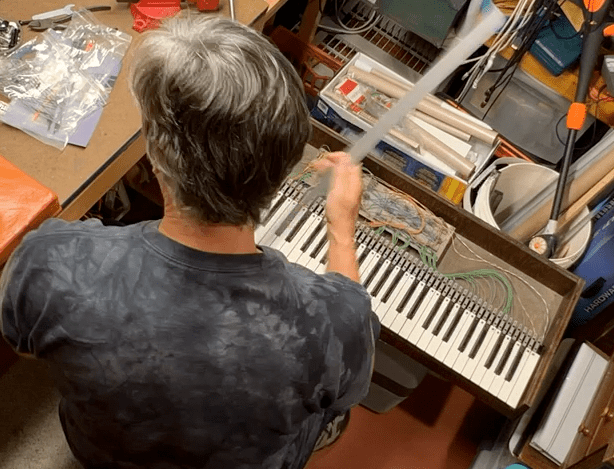
I was a rock-and-roll drummer in high school and wanted to major in music. I also liked science. “Good drummers are a dime a dozen,” my dad said and convinced me to pursue a career in science and engineering. I started college as a physics major, dropped out at the end of my sophomore year, and got a job. Becoming interested in electronic music, I began to build a synthesizer and soon realized that I was more of an engineer than a scientist at heart. I went back to school a year later and changed my major from physics to electrical engineering. After graduation, I got a job in the aerospace industry. As my interests evolved from electronic music and signal processing to image processing, pattern recognition, remote sensing, and mapping, the synthesizer I started to build was forgotten.
Over time I started playing flute and piano. Now, years later, I am thinking about developing music apps and have an idea that uses the iPhone’s built-in microphone to detect musical notes and display them on the screen. My ear for pitch is not as good as my sense of rhythm. With a pitch detector, I would know what others are playing without having to ask about notes, chords, etc. – sort of like having a musical aid. Seems like the sort of gadget others might buy.
September 2008
I finally bought an iPhone and started working on my music app. A lot of signal-processing algorithms operate in the frequency domain. I thought about using a Fast Fourier Transform (FFT) to convert an audio signal into its spectrum but discovered that FFTs are way too compute-intensive for the iPhone. After all, it is just a phone. Instead, I implemented a bank of recursive filters using fixed-point arithmetic. Each filter is tuned to a musical pitch from A0, the lowest note on a piano keyboard, to C8, the highest note. When a note is played, the corresponding filter lights up. The display is kind of geeky – a bar graph showing the response from the filter bank – but it works. I think I’m going to try to sell it on iTunes.
October 2008
Apple approved my pitch detection app, which I named Pitch to Note. My daughter was watching TV a few nights ago and said, “Hey Dad, I think I saw your app on an iPhone commercial just now.” A little later it played again, and sure enough, there it was. It was kind of amazing – in one month I paid $99 to become an app developer, created my first app, saw it advertised on TV, and started making a little money on the side.
Pitch to Note is great for tuning a guitar but is not the best kind of display for a musician. With a little more work, I turned the bar graph into musical notation by mapping detected pitches to notes on a musical staff. I created a new app called Pitch to Note + Chord that also detects chords using a pattern recognition algorithm I invented. The algorithm compares detected notes against all possible chord types in all keys and picks the chord with the best match. Where my first app looked like a science experiment, Pitch to Note + looks like something a musician might actually use.
November 2008
In the early 1970s, I worked on an undergraduate research project to design a digital music synthesizer. Analog instruments like the Moog synthesizer were very popular at the time. The digital approach is based on something called additive synthesis, which involves generating lots of simple sine waves and adding them up to create complex tones. It was a computationally intensive way of generating electronic music. At around the same time, John Chowning at Stanford came up with a different approach based on frequency modulation or FM that was later adopted by musical instrument manufacturers like Yamaha and Korg. In contrast to the computational complexity of additive synthesis, FM uses a few simple oscillators to create really complex and interesting musical timbres with a minimal amount of effort. The idea appealed to me – after all why work harder than you have to?
I’d like to develop an FM synth for the iPhone, but the device is so small I can’t imagine someone actually playing it. So instead of something you play, I think it might be interesting to create an app that uses a pitch detector to feed notes into a synthesizer. The app would in effect “follow” the notes it hears.
Sound from Sound Synth is selling but has a couple of problems. First, is the latency or delay between the time the pitch detector first recognizes a note to when the synth plays it. Electrons moving through an analog circuit at the speed of light have no detectable delay. Latency is, however, a problem with any digital device that processes data by a series of programmed operations (e.g., adds, multiplies, etc.) The iPhone processes audio in chunks, typically about 1K (1024) samples. The iOS operating system buffers chunks so that they can be processed in real-time. At a standard audio sampling rate of 44,100 Hz, three 1K buffers result in a time delay of about 70 milliseconds, which is noticeable.
The second problem with the app is feedback. Let’s say you are playing something on the piano. The microphone picks up the music, the pitch detector sends the notes to the synth, and the synth plays the notes through the iPhone’s speaker, which are picked up by the microphone creating a feedback loop. If you put on a pair of headphones to avoid feedback, the synth follows what you’re playing but with an annoying delay. Not sure where to go with this app so I’m putting it on the back burner for a while.
December 2008
My wife and I live north of Boston on Cape Ann. Like Cape Cod, Cape Ann is best known for its seacoast. Less known is a deserted colonial village in the middle of the Cape known as Dogtown. Soon after moving here a few years ago, I got lost hiking in the woods of Dogtown and decided to map it. Part of what I do for a living involves satellite imaging so mapping Dogtown seemed like a reasonable thing to do. In my free time, I spent many hours hiking and exploring, mapping trails, stone walls, cellar holes, and other features using a handheld GPS and some home-grown Mac software for displaying tracks and waypoints on a map background. In 2007 I published a map and book called The Dogtown Guide.
I’m using Google Earth to create a new digital map of Dogtown that combines ground photos with overhead imagery and discovered a cool feature called a photo overlay. When you click on a photo overlay, Google Earth zooms into the photo in such a way that you’re viewing it in the context in which it was taken. Aside from some demo photos I found on the web, I wondered how to make my own photo overlays. The iPhone with its camera, GPS, and most recent addition, a magnetometer for determining heading, seems like the perfect device for capturing photo overlays. This month I released a new app called Photo-Overlay Tool. Despite its terrible name and even worse design (you can’t see the photo you’ve taken until you download it to your computer), a surprising number of people have bought the app.

January 2009
Getting an app to work can take a while. When it’s finally done, I’m ready to move on to something else, something completely different. Getting back to music, I have an idea for an app that tells you the key of a song in real time. Since Pitch to Note gives us the notes, all we need is a way to determine the key from the notes. So I thought of an algorithm where notes “vote” for musical keys; e.g., a C natural might vote for the keys of C, F, G, and so forth because those keys have a C natural in them, but not, say, for the keys of D, A, and E, which do not. As a song plays and notes are processed, the correct key emerges as the one with the most votes. The algorithm uses what’s called a “lossy integrator” that adds up votes for keys from recent notes and forgets votes from old notes. In this way, the app can track key changes over time. I plot the relative number of votes for all keys on a bar graph displayed over a piano keyboard. Again, not the most inspired user interface. As a song modulates from one key to another the bar graph changes accordingly. What Key was approved for sale early this month and has been doing well despite a few complaints that the app jumps around from key to key, which is strange because that is what most songs do.
In the process of developing What Key, I made some improvements to the pitch detector, which is also used in Pitch to Note and Sound from Sound Synth. I simplified the FM synth in Sound from Sound Synth and built a new app called Resonizer. The app has less latency but still suffers from feedback issues. Although it can generate some “interesting” sound effects, anticipating bad reviews from unsuspecting users, I eventually removed the Resonizer from iTunes.
February 2009
I have this pattern going of developing a music app or two and then switching to a mapping/navigation app. I’ve been hiking quite a bit and am thinking about an app for taking pictures that can be referenced to a map and annotated – sort of like a travel atlas. I call the app iAtlas. Like the iPhone’s camera app, iAtlas stores pictures in a camera roll. A map window shows where each picture in the roll was taken, and an editable text window lets you add short descriptions. Where I had been taking a picture with the camera, adding a waypoint on the GPS, and jotting down a few comments in a notebook, I can now use iAtlas to do all three at the same time. iAtlas is also my first app to communicate with what is becoming known as the “cloud,” allowing you to post and share geo-referenced pictures on a website.
March 2009
I write code but am not a software engineer. I use any and every means to code up an idea. Usually, I start with something I’ve already developed and modify it – cut and paste one section of code from this app, another section from that app, etc. I try to avoid writing anything from scratch. Open source is good, but websites such as Stack Overflow with code snippets are great. I’d probably still be developing my first app if it wasn’t for all the help that’s out there on the internet. That said, there’s a lot of wrong information too, which can get you hopelessly lost.
The mechanics of developing an app is easy if you can code and know your way around the Mac and iOS operating systems. I use a language called Objective C – a dialect of the C programming language, which was developed by researchers at Bell Labs in 1972. Apps are developed within a programming environment called Xcode where you code up the application, create a user interface (UI), add resources the app requires such as sound files and images, and so on. The complete software package is uploaded to iTunes. There you add information about the app (metadata) including pictures and links to demos. Apple reviews your submission. If they find a problem, the app is rejected, and you go back and fix it. When it is finally approved, the app appears on iTunes. So far, I’ve developed about a half-dozen apps in as many months and have been averaging about 30 app sales per day.
April 2009
My wife is an art teacher. Between the two of us and our kids, there are always a lot of ideas floating around. She has been using an Eastern motif known as a mandala to teach art and meditation. It occurred to me that a mandala might be a nice metaphor for a different kind of musical instrument. I found an image of a mandala consisting of a pattern of eight circles around a larger circle. The shape was not unlike an instrument called a hang drum – a metal percussion instrument that is tuned to a fixed scale. I decided on a design for a new instrument where the circles are touch-sensitive pads, each tuned to a note in a scale. I used the FM synth I had already developed as the sound engine. What makes the instrument, which I call Mandala Music, cool is that the scales, notes, and even the sound can be changed. The best part is that they’re no wrong notes, anything you play sounds great. My wife, who cringes at the sound of some of my other apps, loves Mandala Music.
May 2009
A few years ago, my family put together a cookbook of Italian recipes from the Marche region of Italy. My dad self-published the cookbook under the supervision of my mom and aunts. Just returning from a trip to Italy I thought it would be useful to create an app that finds recipes in the cookbook based on available ingredients. Say you have some pasta, garlic, and olive oil. What can I make? After years of my dad telling me to cut the grass and rake the leaves, I decided to put him to work converting the family recipes into XML – extensible markup language. In response to what you have, the app tells you what you can make in the cookbook. I implemented What to Eat? in another language called PHP. What to Eat? is a web app so my relatives who don’t own iPhones but have computers and internet can use it.
Click here to run What to Eat?June 2009
After setting up a web service I realized you could do other things besides serving up Italian recipes. This month I released a free social media app called iBlat that lets you post a picture with a message at your geographic location. It is a way of sharing information geographically. Clicking on a link takes you to a website that shows messages from people who are nearby.
At work, my boss asked me to come up with a demo for a GEOINT trade show. GEOINT, which stands for geospatial intelligence, can be almost anything about the earth’s surface including what’s on it. I thought an app like iBlat might be a good way of collecting and posting GEOINT reports. My two creative universes – developing algorithms during the day and apps at night – were starting to overlap. I was beginning to wonder if other apps I was starting to think about might apply to projects at work and so decided to ask my boss if the company was interested in them. App development was fun, but I didn’t want to run the risk of losing my job over it.
July 2009
Inventing a key algorithm or piece of code that can be used over and over again is important in app development. Without code reuse, each new project starts from scratch and has no connection with other projects. Plus, bug fixes and improvements to one piece of code benefit all the apps that use it.
The pitch detector I developed for Pitch to Note is a key algorithm that has been used in several apps. This month, I’m using it in a new app called Audio to MIDI Recorder to convert live audio into MIDI data. Musical instrument digital interface or MIDI is the standard by which electronic musical instruments communicate with one another and is a common interchange format. If you go online, you can probably find a .mid file for just about any song that someone has sequenced (converted) by hand. I’d like to develop an app that can sequence or transcribe music automatically from audio to MIDI. Audio to MIDI works pretty well with solo instruments but fails miserably on music with multiple instruments, vocals, and percussion. Although I have made some improvements to the pitch detector, I am beginning to realize, mostly from a lot of negative iTunes reviews, that automatic music transcription is a hard problem. Perhaps that’s why nobody else seems to be doing it.
August 2009
Towards the end of the summer, I developed an app that displays images from NASA’s Blue Marble database over any place on Earth. The app shows large-scale features such as Mount Everest and the Grand Canyon in 3D. The effect of depth is created by texture mapping Blue Marble images onto a digital elevation model, which is downloaded along with the imagery. Computer graphics rendering code running on the iPhone generates synthetic images from different look directions that are superimposed and viewed with red and blue anaglyphic glasses. Although rendering is fairly compute-intensive, the time it takes to generate a 3D image is negligible to the time it takes to download the data from the cloud. I’m beginning to realize that communication is the limiting factor in mobile devices, not the devices themselves.
 markcarlotto.com
Leave a comment